Power BI Observability & Governance
One place to monitor, govern, and find every Power BI report.
SummitView gives you refresh health, usage insights, ownership, and a self-service report catalog — all in one secure, read-only portal.
Power BI Health
Overall health score across your entire tenant
94%
87%
72%
Success vs Failed — 7 days
Health
Explore the portal
See how teams find and monitor their Power BI reports
Filters
Business unit
Unlimited usage history
Beyond Power BI's 30-day limit
Detect missing refreshes
Before users notice
Per-table refresh timing
PPU/Fabric supported
Agentless setup
Agent optional for deeper visibility
Scheduling collision detection
Avoid refresh overlap
Consumer report portal
Self-service report catalog
Sound familiar?
You find out about refresh failures from angry users, not proactive alerts
When a refresh is slow, you have no idea which table is the bottleneck
You have no clue which reports are actually being used vs. gathering dust
Power BI only keeps 30 days of history — not enough for real trend analysis
You're not alone. SummitView was built to solve exactly these problems.
See it in action
Watch how SummitView helps you diagnose issues in seconds
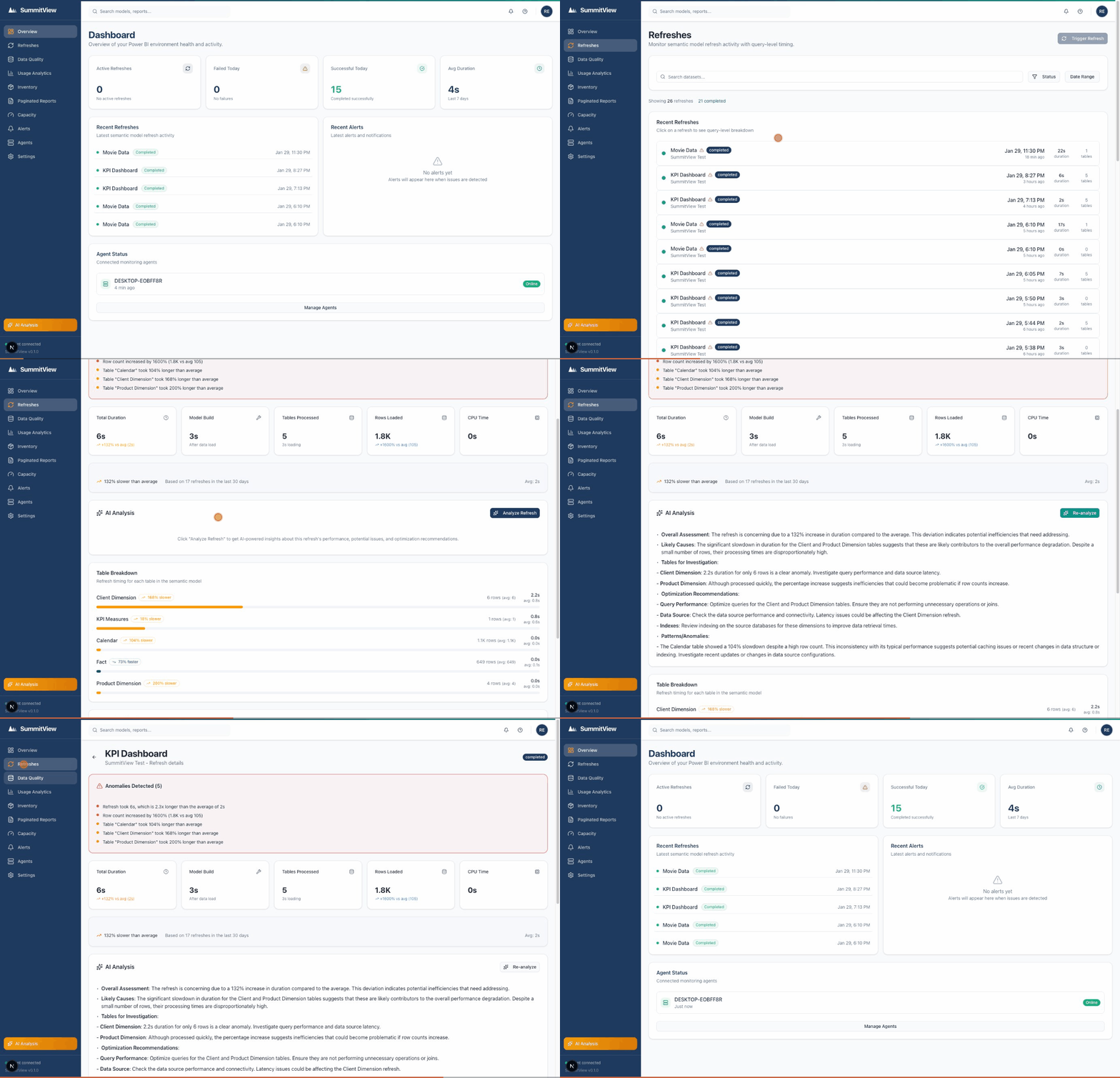
Dashboard overview → Refresh details with AI analysis → Data quality monitoring
Everything you need for Power BI observability
Stop flying blind. Get the visibility your Power BI environment deserves.
Monitor
Know before your users do
- Refresh tracking with per-table timing (PPU/Fabric)
- Missing refresh detection — alert when expected refreshes don't run
- Row count anomaly detection across all datasets
- Failure root cause classification for faster triage
- Teams, Slack, and email alerts with smart cooldowns
Analyze
Turn data into decisions
- Usage analytics with unlimited history (not just 30 days)
- Health scoring for datasets, workspaces, and tenant overall
- Capacity insights — CPU, memory, and throttling detection
- AI-powered recommendations using your own API key (BYOK)
Govern
Structure and control at scale
- Complete inventory of workspaces, datasets, and reports
- Governance editor — tag criticality, owners, and lifecycle
- Scheduling and collision detection across all datasets
- Data readiness — know if reports are ready for business hours
- Data quality monitoring with schema change alerts
Share
Give consumers a front door
- Consumer portal — a branded catalog of published reports
- App and workspace discovery with search and filtering
- Access request workflow for gated reports
- Admin-controlled catalog with opt-in publishing
Why not just use Power BI's built-in tools?
Great question. Here's what you're missing.
| Capability | Power BI Native | SummitView |
|---|---|---|
| Usage history retention | 30 days | Forever |
| Per-table refresh timing | ||
| Row count anomaly detection | ||
| Missing refresh detection | ||
| Scheduling collision detection | ||
| Historical trend analysis | Limited | Unlimited |
| AI-powered recommendations | ||
| Cross-workspace dashboard | ||
| Consumer report portal | ||
| Teams & Slack alerts |
Usage history retention
Power BI
30 daysSummitView
ForeverPer-table refresh timing
Power BI
SummitView
Row count anomaly detection
Power BI
SummitView
Missing refresh detection
Power BI
SummitView
Scheduling collision detection
Power BI
SummitView
Historical trend analysis
Power BI
LimitedSummitView
UnlimitedAI-powered recommendations
Power BI
SummitView
Cross-workspace dashboard
Power BI
SummitView
Consumer report portal
Power BI
SummitView
Teams & Slack alerts
Power BI
SummitView
Metadata Only
Never your business data
Azure AD SSO
Your existing auth
Encrypted Everything
TLS 1.3 + AES-256
Your Own AI Key
BYOK — off by default
SummitView is observability for Power BI.
One price. Full Power BI visibility.
Unlimited users. Unlimited workspaces. Per tenant.
All features included — no feature tiers, no per-user pricing, no usage penalties.
Pro
per Power BI tenant
~$250/mo — 2 months free
- Unlimited workspaces & datasets
- Unlimited users
- Unlimited history retention
- Per-table refresh timing (PPU/Fabric)
- Real-time anomaly detection
- Usage analytics & inventory
- Gateway & capacity monitoring
- Teams, Slack & email alerts
- AI analysis (BYOK)
- Cloud Connect + Agent supported
14 days free • No credit card required
Billed annually. Month-to-month available.
Most teams choose annual for continuous monitoring.
Built for Power BI admins, BI engineers, and IT governance teams — not for business users building reports.
Frequently asked questions
What happens after the trial?
Subscribe to Pro to keep your data and continue monitoring. No commitment during trial.
What Power BI licenses work with SummitView?
SummitView works with Pro, PPU, Premium, and Fabric. Per-table timing requires PPU/Premium/Fabric.
Can I pay monthly?
Yes. Annual is the default ($2,999/yr — 2 months free), but month-to-month billing is available at $299/mo.